
Download Texttovoice – AI Voice Generator, Free, Realistic Text‑to‑Speech
Overview
Texttovoice is a web‑based AI voice generator that turns written text into natural‑sounding English speech. Built for both casual users and professional content creators, the platform offers a clean, browser‑only interface that eliminates the need for bulky installations. Users can choose from a balanced roster of male and female voices, each tuned to deliver clear diction and smooth intonation.
What sets Texttovoice apart is its Generation 2 voice technology, which adds emotional nuance to the output. Whether the source text is a simple announcement or a dramatic narrative, the engine analyses context cues and injects appropriate feelings—such as excitement, calmness, or urgency—directly into the audio. Playback controls include play, pause, and seek, while speed sliders let listeners adjust tempo without sacrificing quality.
For creators who need background ambience, Texttovoice supplies a handful of royalty‑free tracks, and premium characters unlock richer tonal palettes. The service runs entirely in the cloud, meaning updates are applied instantly and users always benefit from the latest AI models. Security is handled via HTTPS encryption, and the platform respects user privacy by not storing raw text longer than necessary.
In short, Texttovoice delivers a fast, secure, and surprisingly lifelike voiceover solution that can be accessed from any device with an internet connection.
Key Features & Installation Guide
Feature Highlights
- Web‑based interface – no download required; works on Windows, macOS, Linux, Android and iOS browsers.
- Generation 2 AI voices that convey emotion based on textual context.
- Choice of male and female voice personas, with premium characters for added depth.
- Adjustable playback speed ranging from 0.5× to 2× without quality loss.
- Integrated background audio library for richer soundscapes.
- Simple playback controls: play, pause, seek, and loop.
- Secure HTTPS connection and short‑term text storage for privacy.
- Free tier with optional paid upgrades for higher‑quality voices and unlimited usage.
Installation & First‑Time Use
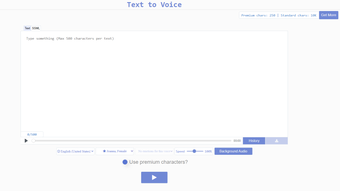
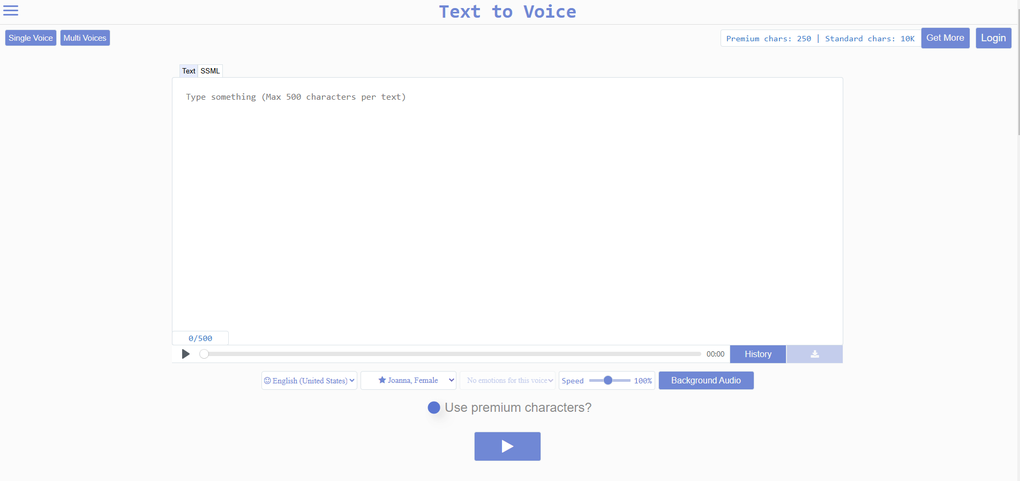
Because Texttovoice is a cloud service, installation consists of opening a modern browser (Chrome, Firefox, Safari, or Edge) and navigating to texttovoice.com. The landing page presents a large text box where you can paste or type your script. Below the box, a dropdown lists available voices; premium voices are marked with a small crown icon. After selecting a voice, you may toggle the “Emotion” switch to let the AI infer the appropriate tone, or manually choose an emotion from a secondary menu.
Once your text is ready, click the bright “Generate” button. The server processes the request in a few seconds, then streams the audio back to the browser. You can listen immediately using the built‑in player, adjust speed with the slider, or drag the timeline to a specific segment. If you are satisfied, click “Download MP3” to save the file locally. For repeated use, you may create a free account; this enables you to store up to ten projects in the cloud and retrieve them later without re‑typing.
The entire workflow is designed for speed: from typing to hearing the final voiceover takes less than a minute on a standard broadband connection. Updates to the AI models are applied automatically, so you never need to reinstall or patch the software.
Compatibility, Pros & Cons, and Frequently Asked Questions
Texttovoice runs entirely in the browser, making it compatible with any operating system that supports modern web standards. Whether you are on a Windows PC, a macOS laptop, a Linux workstation, an Android tablet, or an iPhone, you can access the tool without additional plugins. The only requirement is an up‑to‑date browser with JavaScript enabled.
Pros
- No software download – instant access via web browser.
- Realistic, emotionally aware voice output.
- Flexible playback speed and background audio options.
- Free tier sufficient for small projects.
- Regular AI improvements delivered automatically.
Cons
- Dependent on internet connectivity; offline use is not possible.
- Free version limits the number of premium voices.
- Audio file size may be larger for high‑quality outputs.
FAQ
Is Texttovoice really free?
Yes, the basic version is free and allows unlimited text conversions using the standard voice set. Premium voices and higher‑resolution audio are part of the paid plans.
Can I use Texttovoice for commercial projects?
Commercial use is permitted under the paid subscription tiers. The free tier is intended for personal or non‑profit use only.
What file formats are available for download?
Generated audio can be downloaded as MP3 or WAV, depending on the selected quality level.
How secure is my text data?
All communications are encrypted via HTTPS. Text is temporarily stored only for processing and is deleted within a few minutes after the audio is generated.
Do I need a powerful computer to run Texttovoice?
No. Since the heavy AI computation occurs on Texttovoice’s servers, any device capable of running a modern browser will work smoothly.
Review Summary: Texttovoice delivers a surprisingly high level of realism for a free, browser‑only solution. The emotional modulation adds depth that many competitors lack, while the UI remains approachable for beginners.
Pros: Instant access, realistic tones, flexible playback.
Cons: Requires internet, premium voices behind a paywall.
Conclusion & Call to Action
In a market crowded with downloadable TTS programs, Texttovoice distinguishes itself through its cloud‑first design and Generation 2 emotional voice engine. The absence of installation steps means you can start creating polished voiceovers within seconds, and the free tier offers enough capability for everyday tasks such as podcast intros, e‑learning snippets, or social‑media captions. While the reliance on an internet connection may be a drawback for users who need offline capability, the trade‑off is a continuously improving AI that stays ahead of static desktop alternatives.
If you’re looking for a secure, easy‑to‑use, and cost‑effective way to add high‑quality narration to your projects, give Texttovoice a try today. Click the button below to launch the web app, experiment with the free voices, and decide whether a premium upgrade fits your workflow.



.png)



